<?xml version="1.0" encoding="utf-8" ?>

<?xml-stylesheet type="text/xsl" href="/templates/2k11/atom.xsl" media="screen" ?>
<feed 
   xmlns="http://www.w3.org/2005/Atom"
   xmlns:rdf="http://www.w3.org/1999/02/22-rdf-syntax-ns#"
   xmlns:dc="http://purl.org/dc/elements/1.1/"
   xmlns:admin="http://webns.net/mvcb/"
   xmlns:slash="http://purl.org/rss/1.0/modules/slash/"
   xmlns:wfw="http://wellformedweb.org/CommentAPI/">
    
    <link href="https://daniel-lange.com/feeds/atom.xml" rel="self" title="Daniel Lange's blog" type="application/atom+xml" />
    <link href="https://daniel-lange.com/"                        rel="alternate"    title="Daniel Lange's blog" type="text/html" />
    <link href="https://daniel-lange.com/rss.php?version=2.0"     rel="alternate"    title="Daniel Lange's blog" type="application/rss+xml" />
    <link rel="stylesheet" href="" type="text/css" />
    <title type="html">Daniel Lange's blog</title>
    <subtitle type="html">agrep -pB IT /dev/life</subtitle>
    <icon>//daniel-lange.com/uploads/Avatar_Blog_144_234.png</icon>
    <id>https://daniel-lange.com/</id>
    <updated>2026-09-07T08:52:01Z</updated>
    <generator uri="http://www.s9y.org/" version="2.6.1">Serendipity 2.6.1 - http://www.s9y.org/</generator>
    <dc:language>en</dc:language>

    <entry>
        <link href="https://daniel-lange.com/archives/197-Getting-AVIF-thumbnails-in-XFCE4-thunar-Debian-Trixie.html" rel="alternate" title="Getting AVIF thumbnails in XFCE4 thunar (Debian Trixie)" />
        <author>
            <name>Daniel Lange</name>
                    </author>
    
        <published>2026-09-07T08:50:00Z</published>
        <disable-updated>2026-09-07T08:52:01Z</disable-updated>
        <wfw:comment>https://daniel-lange.com/wfwcomment.php?cid=197</wfw:comment>
    
        <slash:comments>1</slash:comments>
        <wfw:commentRss>https://daniel-lange.com/rss.php?version=atom1.0&amp;type=comments&amp;cid=197</wfw:commentRss>
    
            <category scheme="https://daniel-lange.com/categories/19-Debian" label="Debian" term="Debian" />
            <category scheme="https://daniel-lange.com/categories/18-Internet" label="Internet" term="Internet" />
    
        <id>https://daniel-lange.com/archives/197-guid.html</id>
        <title type="html">Getting AVIF thumbnails in XFCE4 thunar (Debian Trixie)</title>
        <content type="html">
            <![CDATA[<p>The <a href="https://en.wikipedia.org/wiki/AVIF" title="Wikipedia entry for AVIF">AVIF image</a> format gets more and more popular in the web dev community, so I needed to teach XFCE4's thunar (file manager) and Ristretto (image viewer) to thumbnail these.</p>

<p>Luckily that is not too hard:</p>

<p>Debian Trixie separates its <code>gdk-pixbuf</code> libraries slightly differently than previous versions. That's why it is not "automatically there". Ensure you have the <code>libavif-gdk-pixbuf</code> plugin and the tumbler service (which XFCE uses to process thumbnails):</p>

<div class="bash geshi" style="text-align: left"><span style="color: #c20cb9; font-weight: bold;">sudo</span> apt <span style="color: #660033;">--update</span> <span style="color: #c20cb9; font-weight: bold;">install</span> libavif-gdk-pixbuf tumbler</div>

<p>Thunar has likely tried (and failed) to load your AVIF files before you installed the package, it will have saved a blank or "broken image" placeholder in a thumbnail cache directory. It will not attempt to regenerate them unless you clear this cache:</p>

<div class="bash geshi" style="text-align: left"><span style="color: #666666; font-style: italic;"># Clear the thumbnail cache</span><br /><span style="color: #c20cb9; font-weight: bold;">rm</span> <span style="color: #660033;">-rf</span> ~<span style="color: #000000; font-weight: bold;">/</span>.cache<span style="color: #000000; font-weight: bold;">/</span>thumbnails<span style="color: #000000; font-weight: bold;">/*</span><br /><br /><span style="color: #666666; font-style: italic;"># Force-quit thunar and the tumblerd background service</span><br />thunar <span style="color: #660033;">-q</span><br />pkill tumblerd</div>

<p>Tumbled will restart on its own when it is needed. When you open thunar again and navigate to your image directory ... your AVIF images will now generate thumbnails automatically like the other image format did already.</p>

<p><!-- s9ymdb:740 --><img class="serendipity_image_center" width="965" height="613"  src="https://daniel-lange.com/uploads/entries/avif_thumbnails.jpg"  loading="lazy" alt="Avif thumbnails in thunar"></p>
 ]]>
        </content>
        <dc:subject>avif</dc:subject>
<dc:subject>debian</dc:subject>
<dc:subject>image</dc:subject>
<dc:subject>preview</dc:subject>
<dc:subject>thumbnail</dc:subject>
<dc:subject>trixie</dc:subject>
<dc:subject>xfce</dc:subject>

    </entry>
    <entry>
        <link href="https://daniel-lange.com/archives/175-Get-Youtube-Channel-ID-from-username.html" rel="alternate" title="Get Youtube Channel ID from username" />
        <author>
            <name>Daniel Lange</name>
                    </author>
    
        <published>2022-06-01T16:45:00Z</published>
        <disable-updated>2026-08-27T17:52:05Z</disable-updated>
        <wfw:comment>https://daniel-lange.com/wfwcomment.php?cid=175</wfw:comment>
    
        <slash:comments>3</slash:comments>
        <wfw:commentRss>https://daniel-lange.com/rss.php?version=atom1.0&amp;type=comments&amp;cid=175</wfw:commentRss>
    
            <category scheme="https://daniel-lange.com/categories/18-Internet" label="Internet" term="Internet" />
    
        <id>https://daniel-lange.com/archives/175-guid.html</id>
        <title type="html">Get Youtube Channel ID from username</title>
        <content type="html">
            <![CDATA[<p>Youtube has a really nice RSS feature that is extremely well hidden.</p>

<p>If you postfix a Channel ID to</p>

<pre><code>https://www.youtube.com/feeds/videos.xml?channel_id=&lt;id goes here&gt;
</code></pre>

<p>you get a really nice Atom 1.0 (~RSS) feed for your feedreader.</p>

<p>Unfortunately the Channel ID is hard to find while you are navigating Youtube with usernames in the URL.</p>

<p>E.g. <a href="https://www.youtube.com/c/TED">https://www.youtube.com/c/TED</a> is TED's channel, full of interesting and worth-to-watch content (and some assorted horse toppings, of course).</p>

<p>But you have to read a lot of ugly HTML / JSON in that page to find and combine</p>

<p><a href="https://www.youtube.com/feeds/videos.xml?channel_id=UCAuUUnT6oDeKwE6v1NGQxug">https://www.youtube.com/feeds/videos.xml?channel_id=UCAuUUnT6oDeKwE6v1NGQxug</a></p>

<p>which is the related RSS feed.</p>

<p>Jeff Keeling wrote a simple <a href="https://jeffkeeling.github.io/youtube_rss_extractor/">Youtube RSS Extractor</a> that does well if you have a <code>../playlist?...</code> or a <code>.../channel/...</code> URL but it will (currently) fail on user name channels or Youtube landing pages.</p>

<p>So how do we get the Channel ID for a Youtube user we are interested to follow?</p>

<p>Youtube has a great API but that is gated by API keys even for the most simple calls (that came only with v3 of the API but the previous version is depreciated since 2015)<sup id="fnref:1"><a href="#fn:1" rel="footnote">1</a></sup>:</p>

<div class="bash geshi" style="text-align: left"><span style="color: #666666;">dl@laptop:~$ </span>curl <span style="color: #ff0000;">'https://www.googleapis.com/youtube/v3/channels?part=contentDetails&amp;forUsername=DebConfVideos'</span><br /><span style="color: #7a0874; font-weight: bold;">&#123;</span><br />&#160; <span style="color: #ff0000;">&quot;error&quot;</span>: <span style="color: #7a0874; font-weight: bold;">&#123;</span><br />&#160; &#160; <span style="color: #ff0000;">&quot;code&quot;</span>: <span style="color: #000000;">403</span>,<br />&#160; &#160; <span style="color: #ff0000;">&quot;message&quot;</span>: <span style="color: #ff0000;">&quot;The request is missing a valid API key.&quot;</span>,<br />&#160; &#160; <span style="color: #ff0000;">&quot;errors&quot;</span>: <span style="color: #7a0874; font-weight: bold;">&#91;</span><br />&#160; &#160; &#160; <span style="color: #7a0874; font-weight: bold;">&#123;</span><br />&#160; &#160; &#160; &#160; <span style="color: #ff0000;">&quot;message&quot;</span>: <span style="color: #ff0000;">&quot;The request is missing a valid API key.&quot;</span>,<br />&#160; &#160; &#160; &#160; <span style="color: #ff0000;">&quot;domain&quot;</span>: <span style="color: #ff0000;">&quot;global&quot;</span>,<br />&#160; &#160; &#160; &#160; <span style="color: #ff0000;">&quot;reason&quot;</span>: <span style="color: #ff0000;">&quot;forbidden&quot;</span><br />&#160; &#160; &#160; <span style="color: #7a0874; font-weight: bold;">&#125;</span><br />&#160; &#160; <span style="color: #7a0874; font-weight: bold;">&#93;</span>,<br />&#160; &#160; <span style="color: #ff0000;">&quot;status&quot;</span>: <span style="color: #ff0000;">&quot;PERMISSION_DENIED&quot;</span><br />&#160; <span style="color: #7a0874; font-weight: bold;">&#125;</span><br /><span style="color: #7a0874; font-weight: bold;">&#125;</span></div>

<p>Luckily we can throw the same (example) user name <code>DebConfVideos</code> at <code>curl</code> and <code>grep</code>:</p>

<div class="bash geshi" style="text-align: left"><span style="color: #666666;">dl@laptop:~$ </span>curl <span style="color: #660033;">-s</span> <span style="color: #ff0000;">&quot;https://www.youtube.com/c/DebConfVideos/videos&quot;</span> <span style="color: #000000; font-weight: bold;">|</span> <span style="color: #c20cb9; font-weight: bold;">grep</span> <span style="color: #660033;">-Po</span> <span style="color: #ff0000;">'&quot;channelId&quot;:&quot;.+?&quot;'</span><br /><span style="color: #ff0000;">&quot;channelId&quot;</span>:<span style="color: #ff0000;">&quot;UC7SbfAPZf8SMvAxp8t51qtQ&quot;</span> </div>

<p>So <a href="https://www.youtube.com/feeds/videos.xml?channel_id=UC7SbfAPZf8SMvAxp8t51qtQ">https://www.youtube.com/feeds/videos.xml?channel_id=UC7SbfAPZf8SMvAxp8t51qtQ</a> is the RSS feed for DebConfVideos.</p>

<p>We can use individual Youtube video URLs as well. With the hack above, it'll work to find us the Chanel ID from a Youtube video URL:</p>

<p><!-- s9ymdb:690 --><img class="serendipity_image_center" width="920" height="78"  src="https://daniel-lange.com/uploads/entries/220601_Google_Youtube_get_channelId_2.jpg"  alt="Working around the Youtube API restrictions to still make use of their RSS feed"></p>

<p>Now, some user pages may have multiple valid RSS feeds because they contain multiple channels.</p>

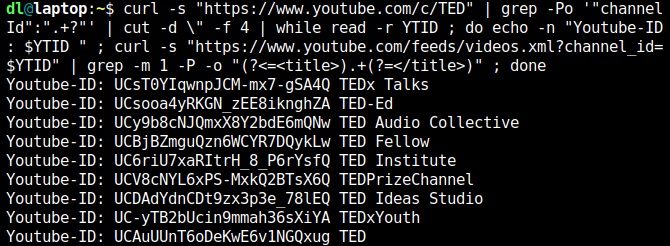
<p>Remember the TED page from above? Well run:</p>

<div class="bash geshi" style="text-align: left"><span style="color: #666666;">dl@laptop:~$ </span>curl <span style="color: #660033;">-s</span> <span style="color: #ff0000;">&quot;https://www.youtube.com/c/TED&quot;</span> <span style="color: #000000; font-weight: bold;">|</span> <span style="color: #c20cb9; font-weight: bold;">grep</span> <span style="color: #660033;">-Po</span> <span style="color: #ff0000;">'&quot;channelId&quot;:&quot;.+?&quot;'</span> <span style="color: #000000; font-weight: bold;">|</span> <span style="color: #c20cb9; font-weight: bold;">cut</span> <span style="color: #660033;">-d</span> <span style="color: #000000; font-weight: bold;">\&quot;</span> <span style="color: #660033;">-f</span> <span style="color: #000000;">4</span> <span style="color: #000000; font-weight: bold;">|</span> <span style="color: #000000; font-weight: bold;">while</span> <span style="color: #7a0874; font-weight: bold;">read</span> <span style="color: #660033;">-r</span> YTID ; <span style="color: #000000; font-weight: bold;">do</span> <span style="color: #7a0874; font-weight: bold;">echo</span> <span style="color: #660033;">-n</span> <span style="color: #ff0000;">&quot;Youtube-ID: <span style="color: #007800;">$YTID</span> &quot;</span> ; curl <span style="color: #660033;">-s</span> <span style="color: #ff0000;">&quot;https://www.youtube.com/feeds/videos.xml?channel_id=<span style="color: #007800;">$YTID</span>&quot;</span> <span style="color: #000000; font-weight: bold;">|</span> <span style="color: #c20cb9; font-weight: bold;">grep</span> <span style="color: #660033;">-m</span> <span style="color: #000000;">1</span> <span style="color: #660033;">-P</span> <span style="color: #660033;">-o</span> <span style="color: #ff0000;">&quot;(?&lt;=&lt;title&gt;).+(?=&lt;/title&gt;)&quot;</span> ; <span style="color: #000000; font-weight: bold;">done</span></div>

<p>This will iterate through the Channel IDs found and show you the titles. That way you can assess which one you want to add to your feedreader.</p>

<p><!-- s9ymdb:691 --><img class="serendipity_image_center" width="670" height="246"  src="https://daniel-lange.com/uploads/entries/220601_Google_Youtube_get_channelId_and_title.jpg" title="Bash automation FTW!" alt="screenshot of the above"></p>

<p>You probably want the last Channel ID listed above, the non-selective "TED" one. And that's the one from the example above.</p>

<h2>Update</h2>

<p><strong>02.06.2022:</strong><br />
smpl wrote in and has the much better solution for the most frequent use cases:</p>

<pre>
You can also use get a feed directly with a username:
https://www.youtube.com/feeds/videos.xml?user=&lt;username&gt;

The one I use most is the one for playlists (if creators remember to
use them).

https://www.youtube.com/feeds/videos.xml?playlist_id=&lt;playlist id&gt;
</pre>

<p>For the common case you don't even need the channel ID that way.
But it is also conveniently given in a <code>&lt;yt:channelId&gt;</code> tag (or the topmost <code>&lt;id&gt;</code> tag) within the Atom XML document.</p>

<p>Thanks, smpl!</p>

<p><strong>27.08.2026:</strong><br />
Of course Youtube had to break it's stuff again.</p>

<div class="bash geshi" style="text-align: left"><span style="color: #666666;">dl@laptop:~$ </span>curl <span style="color: #660033;">-s</span> <span style="color: #ff0000;">&quot;https://www.youtube.com/c/DebConfVideos/videos&quot;</span> <span style="color: #000000; font-weight: bold;">|</span> <span style="color: #c20cb9; font-weight: bold;">grep</span> <span style="color: #660033;">-Po</span> <span style="color: #ff0000;">'&quot;og:url&quot; content=&quot;.+?&quot;'</span><br /><span style="color: #ff0000;">&quot;og:url&quot;</span> <span style="color: #007800;">content</span>=<span style="color: #ff0000;">&quot;https://www.youtube.com/channel/UC7SbfAPZf8SMvAxp8t51qtQ&quot;</span></div>

<p>will get you the Channel ID now (with some cruft around it but you can slice that off yourself, can you? <img src="https://daniel-lange.com/plugins/serendipity_event_emoticate/img/emoticons/smile.png" alt=":-)" class="emoticon" />)</p>

<div class="footnotes">
<hr />
<ol>

<li id="fn:1">
<p>Actually it is even more complicated as some channels, like our DebConfVideos example, will only get you an incomplete result, cf. <a href="https://stackoverflow.com/questions/37267324/how-to-get-youtube-channel-details-using-youtube-data-api-if-channel-has-custom">this StackOverflow entry</a>. I.e. the <code>forUsername</code> iterator may not even work and the "best practice" seems to be mucking around with the <code>search</code> call.&#160;<a href="#fnref:1" rev="footnote">&#8617;</a></p>
</li>

</ol>
</div>
 ]]>
        </content>
        <dc:subject>api</dc:subject>
<dc:subject>atom</dc:subject>
<dc:subject>automate</dc:subject>
<dc:subject>bash</dc:subject>
<dc:subject>channel</dc:subject>
<dc:subject>google</dc:subject>
<dc:subject>rss</dc:subject>
<dc:subject>updated</dc:subject>
<dc:subject>url</dc:subject>
<dc:subject>user</dc:subject>
<dc:subject>video</dc:subject>
<dc:subject>web</dc:subject>
<dc:subject>youtube</dc:subject>

    </entry>
    <entry>
        <link href="https://daniel-lange.com/archives/183-Linux-kernel-USB-errors-71-and-110.html" rel="alternate" title="Linux kernel USB errors -71 and -110" />
        <author>
            <name>Daniel Lange</name>
                    </author>
    
        <published>2023-06-19T11:00:00Z</published>
        <disable-updated>2026-07-31T07:20:05Z</disable-updated>
        <wfw:comment>https://daniel-lange.com/wfwcomment.php?cid=183</wfw:comment>
    
        <slash:comments>14</slash:comments>
        <wfw:commentRss>https://daniel-lange.com/rss.php?version=atom1.0&amp;type=comments&amp;cid=183</wfw:commentRss>
    
            <category scheme="https://daniel-lange.com/categories/8-Linux" label="Linux" term="Linux" />
    
        <id>https://daniel-lange.com/archives/183-guid.html</id>
        <title type="html">Linux kernel USB errors -71 and -110</title>
        <content type="html">
            <![CDATA[<p>After an upgrade of my PC's mainboard BIOS the boot would take a minute or more to complete and sometimes the lightdm login screen would sit there but not accept keyboard input for another minute or so. Then the keyboard got enabled and I could log in normally. Everything worked fine after that bootup struggle completed. This was fully reproducible and persisted across reboots. Weird.</p>

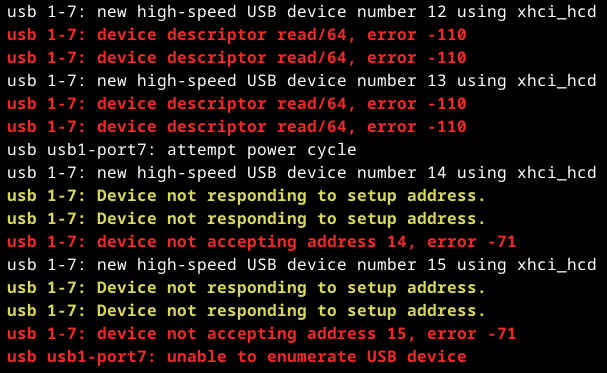
<p>The kernel <code>dmesg</code> log showed entries that looked suspicious:</p>

<p><!-- s9ymdb:708 --><img class="serendipity_image_center" width="607" height="373"  src="https://daniel-lange.com/uploads/entries/230619_Linux_kernel_USB_errors_minus_71_and_minus_110.png"  alt="dmesg log excerpt showing USB error messages"></p>

<p>Googleing these <code>error -110</code> and <code>error -71</code> is a bit hard. Now why the USB driver does not give useful error messages instead of archaic <code>errno</code>-style numbers escapes me. This is not the 80s anymore.</p>

<p><!-- s9ymdb:709 --><img class="serendipity_image_right" width="163" height="176"  src="https://daniel-lange.com/uploads/icons/citation_needed.png" title="This is from https://xkcd.com/285/" alt="Citation needed (Wikipedia style)">
The wisdom of the crowd says <code>error -110</code> is something around "the USB port power supply was exceeded" [<a href="https://askubuntu.com/questions/644010/ubuntu-cant-read-my-usb-device-descriptor-read-64-error-110">source</a>].</p>
<p>Now <code>lsusb -tv</code> shows device 1-7 ... to be my USB keyboard. I somehow doubt that wants more power than the hub is willing to provide.</p>

<p>The Archlinux BBS Forums recommend to <a href="https://bbs.archlinux.org/viewtopic.php?id=149708">piece together</a> information from <code>drivers/usb/host/ohci.h</code> and (updated from their piece which is from 2012) <code>/tools/include/uapi/asm-generic/errno.h</code>. This is why some people then consider <code>-110</code> to mean "Connection timed out". Nah, not likely either.</p>

<p>Reading through the kernel source around <code>drivers/usb/host</code> did not enlighten me either. To the contrary. Uuugly. There seems to be no comprehensive list what these error codes mean. And the numbers are assigned to errors conditions quite arbitrarily. And - of course - there is no documentation. <em>"It was hard to do, so it should be hard to understand as well."</em></p>

<p>Luckily some of the random musings I read through contained some curious advice: power cycle the host. So I did and that did not make the error go away. Other people insisted on removing cables out of wall sockets, unplugging everything and conducting esoteric rituals. That made it dawn on me, the mainboard of course nicely powers the USB in "off" state, too. So switching the power supply off (yes, these have a separate switch, go find yours), waiting a bit for capacitors to drain and switching things back on and ... the errors were gone, the system booted within seconds again.</p>

<p>So the takeaway message: If you get random error messages like</p>

<div class="apache geshi" style="text-align: left">device descriptor read/<span style="color: #ff0000;">64</span>, error -<span style="color: #ff0000;">110</span><br />device not accepting address <span style="color: #ff0000;">42</span>, error -<span style="color: #ff0000;">71</span></div>

<p>on devices that previously worked fine ... completely remove power from the host, the hubs and the USB devices. So they forget they saw each other on the bus before. And when they see each other after that blackout, they will happily go through negotiating protocol details successfully.</p>
 ]]>
        </content>
        <dc:subject>codes</dc:subject>
<dc:subject>error</dc:subject>
<dc:subject>hardware</dc:subject>
<dc:subject>kernel</dc:subject>
<dc:subject>linux</dc:subject>
<dc:subject>usb</dc:subject>

    </entry>

</feed>