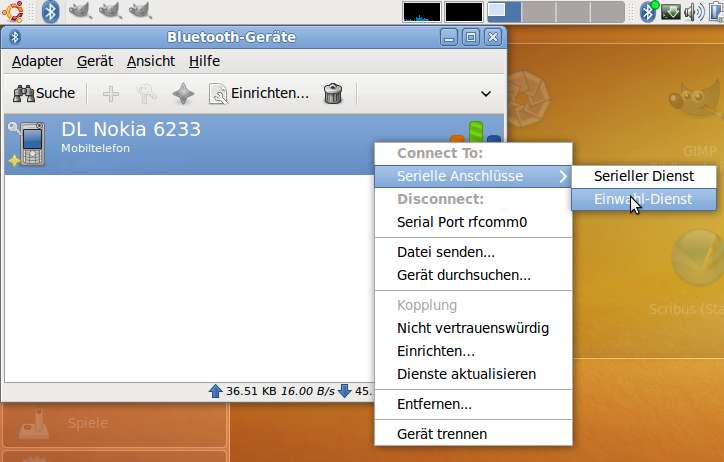
Using a mobile phone's Bluetooth Dial-up network (DUN) to connect to the Internet (UMTS/GPRS) while on the road is quite convenient for me. Sadly so this is not supported out-of-the-box in Ubuntu Karmic 9.10 (Netbook Remix) as it uses Network-Manager to handle - well - network connections. And that is not quite there on Bluetooth managed devices yet.
While the default solution (rfcomm and Gnome-PPP) still works, it's ugly to set up. Sadly so, zillions of Ubuntu-Forum threads and blog entries still detail this solution - or the issues encountered with it along the way.
The much better solutions is using Blueman, an improved Gnome-Bluetooth primarily developed by Valmantas Palikša. It brings the right UDEV magic along to teach Network-Manager about the Bluetooth devices it handles.
Just follow the steps on their downloads page to set up the Blueman PPA (Personal Package Archive) to get things working.
For some unknown reason the (K)Ubuntu developers did not update the Java plugin for firefox after jaunty (yet?).
The version that Karmic (9.10) pulls out of the multiverse repository is still jaunty's (9.04).
So when you try:
apt-get install sun-java6-plugin
you'll get something like
   Reading package lists... Done
   Building dependency tree
   Reading state information... Done
   Some packages could not be installed. This may mean that you have
   requested an impossible situation or if you are using the unstable
   distribution that some required packages have not yet been created
   or been moved out of Incoming.
   The following information may help to resolve the situation:

   The following packages have unmet dependencies:
     sun-java6-plugin: Depends: sun-java6-bin (= 6-15-1) but 6-16-0ubuntu1.9.04 is to be installed
   E: Broken packages
Duh.
Actually if you have the Java Runtime Environment (JRE, package name sun-java6-jre) installed all files needed are already present.
Just not put in the right place on the filesystem.
So, run:
sudo apt-get install sun-java6-jre # install JRE if needed
sudo ln -s /usr/lib/jvm/java-6-sun/jre/lib/amd64/libnpjp2.so /usr/lib/mozilla/plugins/
This will install the JRE (if it's not already installed) and will symlink the firefox plugin for java in place so that it'll be found after a browser restart.